

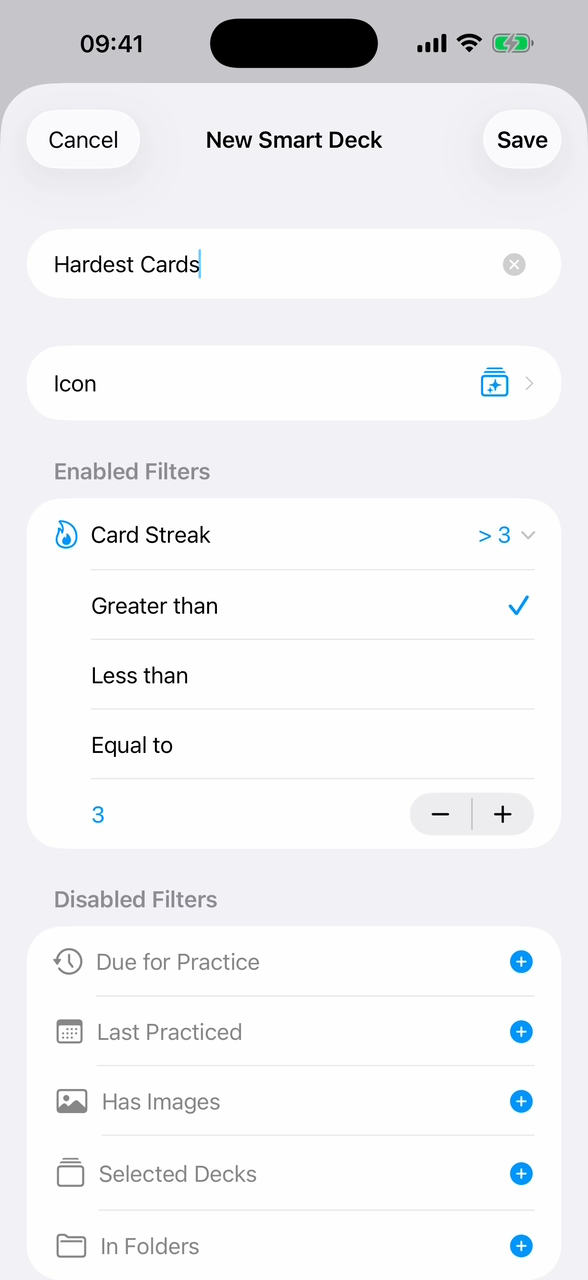
Most flashcard apps tie a card to one deck. That works until you want to focus your review somewhere else for a day, only the cards from a specific lesson, only the ones you keep failing or only the ones with images.
Swiftflip Smart Decks solve that. A Smart Deck is a dynamic collection that updates automatically based on rules you set.
What Smart Decks do
A Smart Deck is a saved query, not a copy of cards. The cards stay in their original decks and folders. The Smart Deck just gives you a view of the cards that match your rules right now.
That makes them useful for focused sessions without disturbing your existing organization.
Available rules
Build a Smart Deck with any combination of:
- Due for Review: only cards that are due now
- Card Streak: cards with a streak count above, below or equal to a number you set
- Last Practiced: cards reviewed in the last N days, or not practiced for at least N days
- Has Images: cards with an image on the front, the back or either side
- In Decks: cards from one or more specific decks
- In Folders: cards from a folder and everything nested inside it
Combine rules with AND for “match all” or OR for “match any”.
Examples
A few Smart Decks that come up in practice:
- Last week’s lesson: In Decks: Spanish 7, Last Practiced: less than 7 days ago
- Cards I keep failing: Card Streak less than 2, In Folders: French
- Image-heavy cards before bed: Has Images, Due for Review, In Folders: Anatomy
- Hardest cards across all decks: Card Streak less than 2, In Folders: anywhere
The filter editor in Swiftflip is built like Reminders smart lists, so each rule is a row you can add, edit and reorder.
The free Due for Practice smart deck
The system “Due for Practice” smart deck is built into Swiftflip and free for everyone. It collects every card that is due across all your decks and folders. If you only want one Smart Deck, this is the one you already have.
Smart Decks are Premium
Custom Smart Decks you build yourself are part of Swiftflip Premium. The free Due for Practice smart deck stays available either way.