
Set up Hold That Tab in Safari
Enable the Safari content blocker on your Mac, choose the profiles that use it and check that homepages stop while direct links still open.
Hold That Tab blocks habitual homepage visits in Safari on Mac. It is a one-time purchase for macOS 15 or later. The app manages the list; Safari’s content blocker applies it.
Safari setup help
Mac
Follow the steps in Help
Help explains where Safari keeps its extension settings.
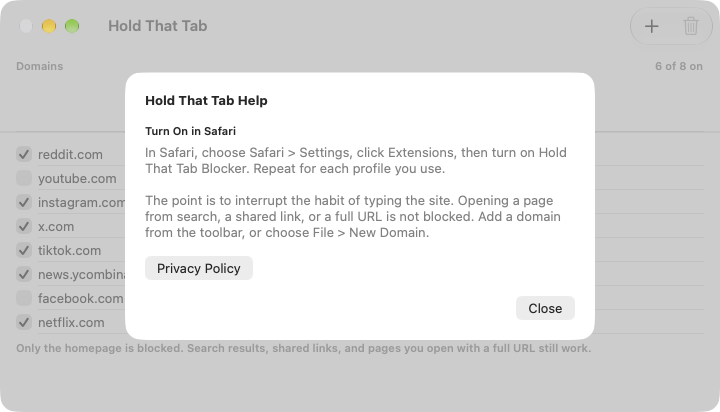
Turn on the Safari extension
- Install Hold That Tab from the Mac App Store and open it.
- Open Help in Hold That Tab if you need the setup instructions.
- In Safari, choose Safari, Settings, then Extensions.
- Enable Hold That Tab Blocker.
The app shows a setup banner when the blocker is off. It provides instructions; it does not open Safari Settings for you.
Choose the Safari profiles
If you use Safari profiles, enable the blocker for each profile where you want it. For additional profiles, open Safari Settings, Profiles, select the profile, then choose Extensions and enable Hold That Tab Blocker. A profile with the extension off will not apply the blocklist.
Apple’s Safari profile instructions explain where each profile’s extensions are selected.
Check the result
Add a domain in Hold That Tab and leave its switch on. For example, adding reddit.com blocks its homepage, including www.reddit.com. A link to a particular post remains available.
Open a new Safari tab and try the homepage, then a direct link with a path on that domain. Reload a tab that was already showing the homepage before the rule changed.
If the homepage still opens
Check that the domain is on, the blocker is enabled in the Safari profile you are using and you are visiting the domain’s homepage. Another subdomain is a separate entry. A URL with an article or other path is intentionally allowed.
The blocker works in Safari on Mac. It does not block Chrome, other browsers or separate apps. For domains, toggles and iCloud, continue with Manage and sync your blocklist.