
On this page
Brevier is an EPUB reader for Mac. It opens the DRM-free EPUB, PDF and plain-text books you already have, in a native Mac app with its own menus and keyboard shortcuts. The same library syncs to Brevier on iPhone and iPad through your own iCloud.
Which books Brevier opens
- EPUB files without DRM
- PDF files, which keep their own pages
- plain-text files
Brevier has no store. You add the files yourself, such as a public-domain EPUB from Project Gutenberg or a book a publisher sold you without DRM.
What Brevier cannot open
- Books protected by DRM, such as most ebook store purchases. Brevier says the book contains protected content and asks for a DRM-free copy.
- PDFs locked with a password. Save a copy without the password, then add that.
- Other ebook formats, such as MOBI.
Brevier sets EPUB text in the font, spacing and theme you choose. It does not use a publisher’s stylesheet or embedded fonts, and a fixed-layout EPUB does not keep its page design.
A scanned PDF with no text can be read and bookmarked, but it has nothing to highlight, search or explain.
Add a book on Mac
Choose File > Add Books or press Command-O, then pick one or more files. You can also drag files into the library window, or Control-click a file in Finder and choose Open With > Brevier.
Brevier copies each book into its library, so the file you added is not needed afterwards. Add books to Brevier has the steps for iPhone and iPad too.
Reading on a Mac
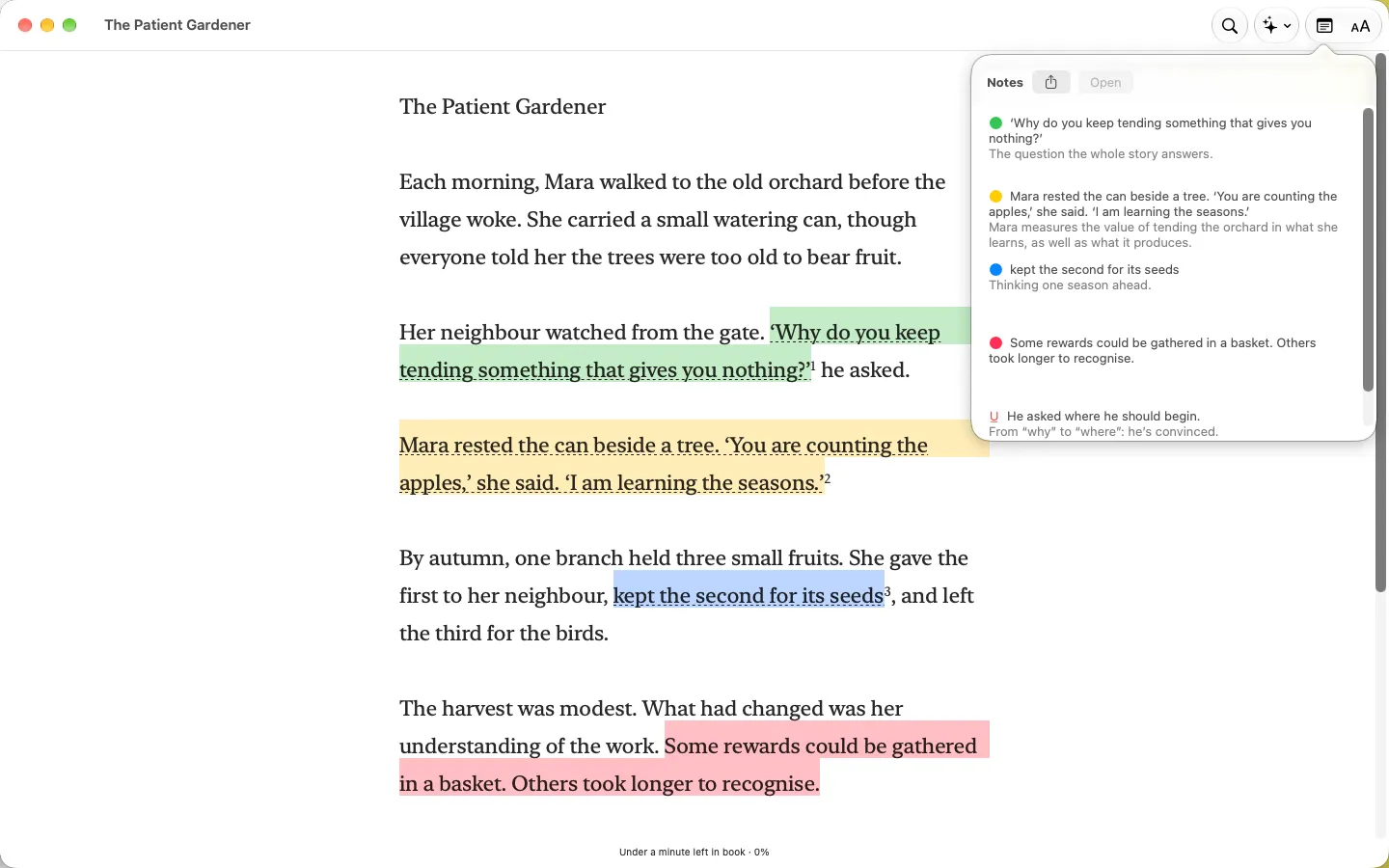
A book on Mac, with its highlights and notes listed beside the page.
- Read in one continuous scroll or turn pages.
- Reading Options has the font, text size, margins, line and word spacing and Justify Text, along with six themes in light or dark.
- Arrow keys, Space and Page Up or Page Down move through the book. Command-F finds text, Command-D adds a bookmark and Command-plus or Command-minus changes the text size.
- Contents and links take you around the book, and a footnote opens over the page you are on.
- Search finds a passage, a note or an Explain conversation across your whole library.
PDFs keep their original pages, so Reading Options and text size do not apply to them.
Highlights, notes and Explain
Select text to highlight it in one of five colors or an underline, or to attach a note. View > Notes lists every highlight and note, and a book’s notes export as Markdown. Highlight and take notes in EPUB and PDF books covers this in full.
With Brevier Premium, Explain answers questions about a passage, a page, a chapter or the whole book and cites the passages it used. It is optional and asks before it sends anything. See ask questions about the book you are reading.
The same library on iPhone and iPad
Brevier is also on iPhone and iPad, where pages can curl as you turn them. A book you add on one device appears on the others, and each book opens where you left off. Handoff continues the book you are reading on another device.
Brevier needs macOS 27 or later on a Mac with Apple silicon, and iOS or iPadOS 27 or later on iPhone and iPad.
Privacy
Your books, notes and reading positions stay on your devices and sync through your own iCloud. We cannot see them. Brevier has no account, ads or tracking.